The Blog Market

  • Home
  • About
  • Resources Directory
  • Advertise With The Blog Market
  • Contact Us

Spring Cleaning + Workspace Must Haves

May 7, 2015 by jennifer Leave a Comment

The other day I realized that the whole month of April had gone by and I’d barely completed any of the blogging topics from our big spring blogging ideas list. So I tackled one I’ve really been meaning to do–spring cleaning my workspace. It wasn’t too bad since we moved last month, I mostly just had a lot of setting up to do. After getting rid of the clutter and adding a few pieces, everything came together (with the help of three things).

Organized Workspace | Studio Spring Cleaning | The Blog Market

1. Cozy seating. First things first, making my chair a bit cozier. I’ve been stalking Craigslist like crazy for the perfect vintage dining chair that I can use for my desk. I’m waaaay too picky so this has literally been my mission for months and I still have this old rolling chair that my dad used to use when I was in high school. I took it to college and then all the way down to LA. It’s not very comfy or pretty though, so for the time being I punched it up a bit.
Organized Workspace | Studio Spring Cleaning | The Blog Market

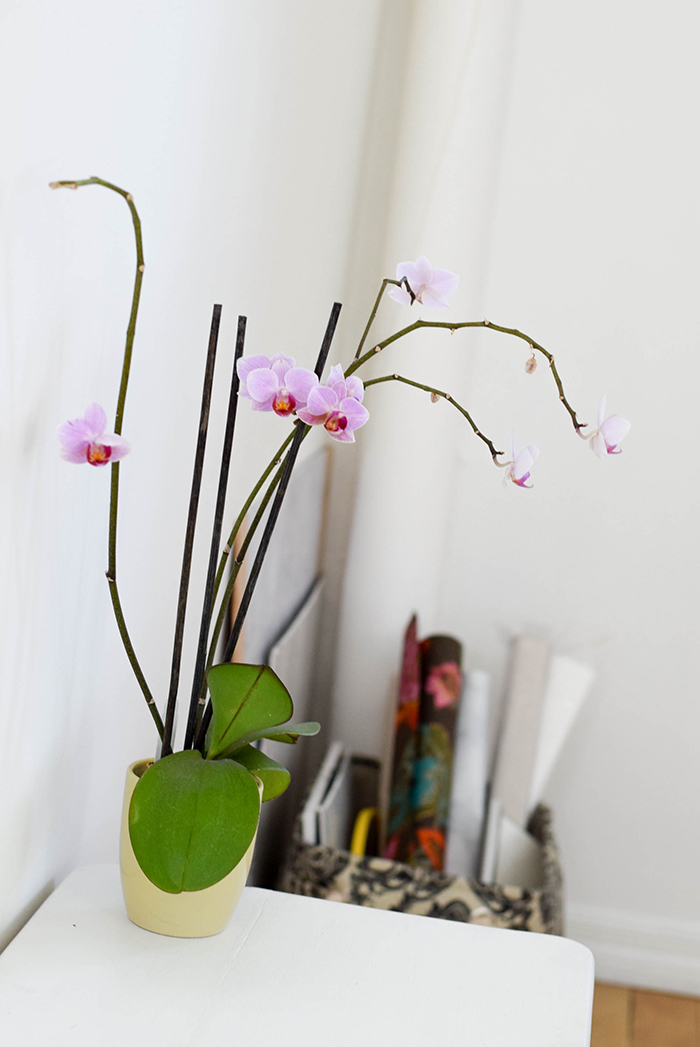
2. House plants. Then it was onto arranging my plants. I’ve been on a plant kick lately, it’s the perfect way to accessorize my sunny apartment. These orchids aren’t exactly thriving but they sure are surviving. I always forget how dry it gets here. Related note: succulents actually do need a little TLC!

Organized Workspace | Studio Spring Cleaning | The Blog Market

3. Candles. I cleaned off my desk of all the clutter (notebooks are now stacked neatly underneath) and added one last necessary ingredients: candles. Candles are a must-have for my office space because I so often work at night. Nothing like sitting down with a glass of wine, a few candles, and knocking out a couple blog posts. (Even though I’m a bit paranoid about forgetting to blow them out.)

Anyone else spring clean their workspace last month? Link us to the posts.

PS: Be super careful about drinks + laptops! I damaged my Macbook when I went to grab my coffee (in a paper cup with a lid, too!) and it got caught on my headphones and just a bit spilled on it. I had to pay major $$$ to get it working again. Hope this never happens to anyone else!

Leave a Comment

May Desktop Download

May 6, 2015 by jennifer Leave a Comment

I know we’re a few days into May but I have a new desktop for you! This one is a little more cutesy than past calendars I’ve posted. But when I think of May, I think of flowers…and more flowers. Flowers on everything. Click the link below to download the calendar!

May Calendar Desktop Download  |The Blog Market
download

What are you up to this week? I’m freelancing a bit and working on some new design posts.

Is there anything in particular you’d like to see on The Blog Market in the coming weeks? Let us know! 🙂

Leave a Comment

6 Social Media WordPress Plugins We Love

May 1, 2015 by jennifer Leave a Comment

One of the things that first attracted me to WordPress was the fact that I could use plugins. It’s pretty awesome that even if you don’t know anything about jQuery, JavaScript, or other fancy coding languages, you can still use professional features on your blog. When used thoughtfully, WordPress plugins can make a website extremely user friendly and generate a bunch of traffic as well.

Social Media WordPress Plugins | The Blog Market

1. Font Awesome Icons. These are icons that you can use on websites or in Photoshop that are actually font-based. While you can use them on any platform, WordPress has a plugin that makes it really easy to display these icons throughout your site.  I love having font-based icons because they’re super clean, never fuzzy, and you can change up their colors on a whim without uploading images. Check out the Font Awesome Cheatsheet here.

2. Sharing Plugin from Jetpack. This is an option that you can find within the Jetpack plugin (which I highly recommend exploring). We finally added these share buttons to our posts this week! I think this is the best sharing plugin because it includes several social options and with a little CSS, it can blend in perfectly with your brand.

3. Pinterest RSS Widget. This is the cleanest Pinterest widget I’ve come across yet. I appreciate how it can blend in with almost any brand without looking out of place or distracting. Formatting this widget requires a little CSS sometimes, but not much. Take a look at our sidebar to see how we use this plugin!

4. jQuery Pin It Button for Images. This plugin allows you to add and customize a Pin It button that will appear when people hover over your images. You can keep it simple with a text-only style or you can get more decorative and upload a graphic. It’s an amazing way to get your photos pinned and it also adds something interesting to your design.

5. Recent Tweets Widget. We don’t currently use this plugin but love how simple it is! It displays your tweets in a list with that little bird icon and no extra frills (unless you want them). If we end up using a Twitter plugin in the future, it’ll probably be this one.

6. Instafeed. Here is another plugin that we don’t currently use but have tested and really like! The photos link directly to Instagram which is a great alternative to Snapwidget (although their layout options are amazing). The thumbnails on Instafeed will automatically appear in a vertical list, but you can use a little CSS float:left; action to get them to into a grid.

Let’s keep this list growing! Add any of your favorite WordPress social media plugins in the comments. 🙂

Leave a Comment

DIY Your At Home Photo Studio Pt. II – The Camera

April 29, 2015 by jennifer Leave a Comment

Last week, I talked about how I make the most of lighting, and now we’re on to the equipment. I’ve seen so many posts about photography over the last few years, but most of the time I couldn’t take the advice because I didn’t have over $2,000 to spend. For blogging purposes, I prefer (and so does my wallet) to keep my equipment stash fairly small, and as efficient as possible! So, here’s what I use, if you care to know! CAUTION: This post is LONG.

Best Cameras for Blogging / Affordable dSLR Cameras^ When I don’t have my camera or phone = grainy photos. 

The Camera

I recently bought a Nikon D5300. Before, I used a Nikon D40 for about 6 years (which I’d still have if I had taken care of it). It was the BEST deal on a good camera. Though I’ve used Canons a couple times, I’m comfortable with Nikon and it’s almost always more affordable. In my opinion they’re also easier to use. Jennifer uses a Canon and loves it, but she had to invest a lot more initially, so keep that in mind if you’re on the lookout for dSLRs!

My suggestion for an affordable camera? Buy the body only. It’s cheaper and if you want a really good lens, skip right past the kit. I didn’t do this the first time and ended up never using the kit lens. Instead, I purchased the Nikon body for $650, and invested in two nicer, different lenses right away (notes below), that I actually use. There are also bundles that can save you $, but after researching, I learned that this was the best route to get the right lenses.

If you’re on the lookout for a camera, take other opinions (like mine) into consideration, but make sure not to just go with what one person says. Photographers don’t all use one brand, so don’t feel like you have to go with anything specific, just what will work for you.

The Lenses

Nikkor 55-200mm zoom lens: $150 The first lens I ever got aside from the kit lens. Perfect for both portraits + nature, that’s what I took photos of most of the time, so it was ideal. Since upgrading to the D5300, I’ve got two new ones, but I still love this one overall. If you blog about travels or adventure, I definitely suggest it, but this lens is also an option:

Sigma 18-250mm lens: $290-$400 You can grab this for Nikon or Canon. I purchased it because it has great reviews as a walkabout lens, which literally is what I do all the time (haha). I wanted to walk around, zoom in on something I saw, snap photos, etc. But I also wanted to zoom out to photograph Etsy stuff or DIY, so it had to be a wide range. While this is a good go-to, I actually use the 50mm below more for blogging because the lens creep on this one is REAL, making it somewhat annoying to take flaylays and such. Plus it’s heavy. Still, if you want a huge range all in one lens, this is an option.

A 50mm f/1.8 lens: $100-$200 Perfect for portraits, the 50mm lens is my go to most of the time. I’m obsessed with the lighting and clarity the Nikon version provides every damn time, on automatic, and Jenn loves her Canon equivalent. Even though I always have to stand on a chair when I use it for blog photos (like the one featured here), the result is so amazing I don’t even mind. If you style blog or have people in your shots a lot, this one is a must too.

I was able to get the perfect camera kit for me by buying the body + two lenses for a total of $1350. For blogging, I’d be totally satisfied with just the 50mm, in which case I’d have my tools for under $1,000. If you’re on a budget but won’t compromise quality, I do suggest this! But, there’s one other FAB budget friendly option for blogging cameras… The iPhone 6!

The Phone

iPhone 6: I can’t speak for the 5, as I owned the 4 before this, but I’d have never taken blog photos with a phone before I got the 6. I bought it last fall because a new camera wasn’t in the budget and I needed one for work. I was submitting articles and not getting good photos to go along with them. This saved me! Plus, I went on a road trip to Big Sur right after purchasing and am beyond happy because I got wonderful photos from it. The only thing I took my SLR out for (which at the time was falling apart) was to use the 200mm to whale watch. I don’t exactly understand why, but iPhone 6 is amazing at landscapes. I always take it out at the beach. As far as blogging, this is pretty much all you need, though you will have to sacrifice zoom for the most part. Having all the above is better, but there are a ton of bloggers that use iPhone only and if you’ve got a good eye for composition, know how to work with lighting, and work to get that amazing shot, the iPhone 6 is a perfect investment to have all your tech in one place.

Going on 900 words here, so I’m going to stop! What’s been your biggest photography investment? For those of you on the fence about equipment, I hope this helps!

Leave a Comment

Weekly Resources | Social Media

April 24, 2015 by jennifer Leave a Comment

Good morning! How is this month treating you? Any new blogging or business ventures? I’ve been working on a design studio and I am anxious to get it launched already. Apparently there’s this nit-picky perfectionist inside of me who needs to keep working on the details for a while longer. 🙂

If there’s one blogging practice I need to work on a little more, it’s engaging in social media. I tend to use it for personal reasons more than business-y reasons. This week I gathered up some tips that are inspiring me to be more intentional with social media as it relates to blogging and business.

Social Media Resources for Bloggers | The Blog Market

1. The Well has a detailed guide to organizing your social media. They cover several topics including studying analytics and scheduling your posts. Super helpful! There’s a free downloadable workshop in there too.

2. I’m one of those people who rolls her eyes at Facebook but secretly finds it really helpful. This year I’ve joined a couple of Facebook groups for entrepreneurs and I’ve made amazing friendships and even business connections! Here is a lovely post by Nesha Designs about how you can get clients from Facebook groups.

3. Amber wrote an awesome post about writing the perfect social media bio! It’s always so much more difficult to write than you’d think. And so awkward! Amber includes a simple list of questions to answer in your bio. Going to be using these for sure.

4. Love these tips from Chloe Social about having consistent branding throughout your social media accounts. So spot on.


Enjoy these reads and have a happy weekend!

Leave a Comment

  • Newer Posts
  • 1
  • …
  • 85
  • 86
  • 87
  • 88
  • 89
  • …
  • 99
  • Older Posts

Recent Posts

  • Easy Ways to Add Greenery to Your Workspace
  • How to use Pinterest board sections to get organized + stay inspired
  • Friday Favorites 05 | Terrazzo Trend
  • Best Creative Planners for 2020
  • 10 Journal Prompts for Creative Motivation

Recent Comments

    © 2018 The Blog Market · · BACK TO THE TOP