The Blog Market

  • Home
  • About
  • Resources Directory
  • Advertise With The Blog Market
  • Contact Us

Hello Sunshine Wallpaper + #tbmsummervibes

July 20, 2015 by jennifer Leave a Comment

Good morning! Now that we’re in midsummer, we have been trying to find ways to build community on TBM and make this the most inspiring summer both online and in the real world. If you’re following us on Instagram you might have noticed we’ve been using the hashtag #tbmsummervibes for the past few days. As a way to show our appreciation for this wonderful season and engage in the amazing creative community on IG, we want to invite you guys to hashtag along with us! We’ll be regramming photos we especially love and sharing a few on the blog too.

This week I thought I would share a simple desktop wallpaper download in one of my favorite summery color palettes. Click the links below the image to download this for your desktop, iPad, or iPhone.

Hello Sunshine Desktop + Mobile Wallpaper | The Blog Market

desktop / ipad / iphone

What do you think of more non-calendar wallpaper downloads in the future?

Hope you’re having a great start to the week!

Leave a Comment

Weekly Resources For Bloggers

July 17, 2015 by jennifer Leave a Comment

Hey! How was everyone’s week? This week flew by for me. So weird that it’s already Friday! Lately we have been rounding up posts by different themes, but today I want to go back to a random assortment of resources for bloggers that I am just loving this week. I feel like so many blog posts I’ve read recently have resonated with me a ton, whether in regards to The Blog Market or my freelance work. It’s always nice to see that other bloggers and creatives have similar topics on their minds. Guess a lot of us are on the same wavelength. 🙂

Resources for Bloggers | The Blog Market

1. When you’ve taken a hiatus from blogging, no matter how short, starting it up again can feel a little unnatural. Here are 10 tips for getting back into blogging by Jessica of The Blogging Brew!

2. Sometimes planning out blog post ideas can be super overwhelming. Erica of Dwell Beautiful shared 5 tips to streamline blog planning. Love how detailed and practical these tips are!

3. Raise your hand if you take on way too many unrealistic tasks. Dana of The Wonder Forest recently shared an amazing post on giving up control and outsourcing some of those daunting tasks.

4. I love this post on The Feisty House about how to blog consistently and why it’s important. Krystal points out that blogging consistently creates a sense of community on your blog. So true! People will expect to hear from you (whether it’s 2 times a week or every single day) and they’ll stick around.

What do you think of these posts? Any inspiring resources we missed this week?

Have a wonderful weekend!

Leave a Comment

How to Prepare Your Etsy Shop for Fall

July 15, 2015 by jennifer Leave a Comment

We all want our businesses to be successful year round, but many of us thrive seasonally. Buyers shop seasonally, so there’s really no way around it. Although I shipped scarves and coffee cozies everywhere, my shop still always took off from September–December and experienced a major lull from February through summer. That’s over half the year! I think a lot of people who have seasonal shops like mine find other means of income during those times–either other ways to sell, other things to sell, or have other jobs. Crafters tend to have more than one craft after all. While I could’ve come up with other products (though, crochet always comes off as fall, no matter how springy the item), or thrown myself into vintage (which at times I did) I always chose to dedicate late spring and the summer months to preparing my Etsy shop for the fall rush.

Even if you’re not selling strictly winter items, there’s no denying that biz picks up leading up it the holidays. Making the most of these months before it is vital to Etsy success (read: profit). Things can seem slow at first but they have this ability to take time off instanely fast and provide endless growth opportunity. Onto my tips for preparing for a good last half or even quarter of 2015 on Etsy:

How to Prepare Your Etsy Shop for Fall | The Blog Market

Get your inventory up to speed

Especially if you take custom orders or have physical inventory, it’s a good idea to get as much of your product as possible prepared before the season starts. Oh my goodness do custom orders take time, even with the things that are normally quick to whip up. Collaborating, shopping, communicating—it all takes so much time! Doing this while getting sales in your shop and shipping orders can be seriously overwhelming. Not to mention if you need to shoot or upload photos each time you sell something. (Side note: The more you list, the more you can sell, not just because you’ll actually have more, but you’ll show up in search, which is difficult with little product, and it’s exactly why a lot of people list each item individually–even if they are simply different colors or sizes.) Create and shoot your product in advance, then list throughout the season.

Get all the nitty gritty out of the way

Tags, titles, descriptions, I call all these things the nitty gritty. If your shop really needs help getting seen, now is the time to do so. This is SO important. You can create all the product in the world, the most unique and in demand of items, and get not a single sale if no one enters your shop. Just like listing a lot, the more people that enter the shop page, the more you have the chance to make a sale. That’s why all of the text and visuals on your page are so important, they contribute to the customer’s experience. (Ecommerce is such an awesome outlet for us introverts, but that doesn’t absolve us from having to make that sale!) For more information on improving your Etsy, check out this post on product descriptions and these photography resources. Make sure to give yourself time to implement the strategies.

Set your social media strategy in place

No matter how big or small your social strategy, it’s a good thing to consider early on. Whether it’s deciding whether you’ll put money into boosting your Facebook posts, making your images pinnable, or launching a full-on social media plan of attack, putting the plan in place beforehand saves you time and gives you a buffer if you need to change anything. What we who have done social media for businesses know—regardless of if we were successful or not—and those who have never experimented with it before don’t is this: It. Takes. Time. Hours even. Hours daily even. Unless you’ve got a bunch of extra hours to spare that you’re going to choose to spend on Facebook and Instagram, might as well make it easy on yourself! These resources that we’ve had up on TBM before like Pinterest for business and Instagram for business can definitely help can Etsy shop. It’s intimidating but it can pay off big time!

These three things are pretty basic… Feel free to add more in the comments. And, I’m happy to go into specifics on any of these things as the season inches closer! If you have a shop, link below. Maybe we can feature it in a roundup!

Leave a Comment

Creative Studio Wishlist

July 14, 2015 by jennifer Leave a Comment

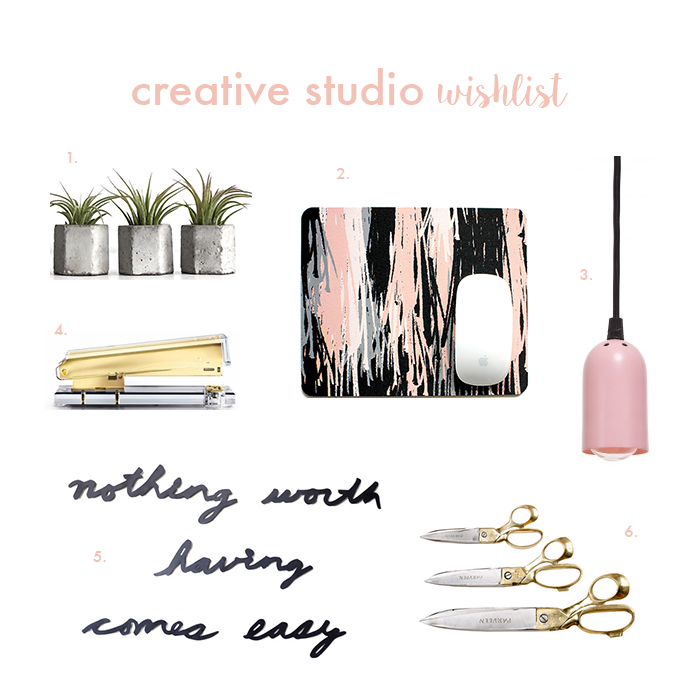
Morning! Yesterday I wrote an email with an August deadline and had a mini panic moment realizing it’s almost August 2015. Whaaaat? That seems crazy to me. I don’t know how I let time get away! Anyway. My latest studio roundup is part practical (I actually really need a mousepad, even for my MacBook–Do you know how not ergonomic laptops are? I’m finally forcing myself to make sure my body is comfortable while I edit photos and type) part whimsy–like the wall inspiration from Dot & Bo, which is made of stamped metal and is just plain wonderful. Actually, I could convince myself that it IS practical, as I thrive on constant positive reminders throughout the workday.

Creative Studio Wishlist | The Blog Market


Okay, I could convince myself this is all practical. In fact, I’m doing it now (convincing, not buying). Waaaant.

1. Concrete Planters | frae + co.
2. Painterly Mouse Pad | Think & Ink Studio
3. Pink Polka Pendant Light | abc carpet & home
4. Gold Acrylic Stapler | The Organizing Store
5. Motto for Perseverance Wall Decals | Dot & Bo
6. Tailor’s Handcrafted Shears | Connected Artisans

Yes, those are handmade scissors! Aren’t they amazing? I’m not sure if it’s been awhile since I’ve visited Connected Goods (now artisans) or they got a major facelift but the site and products are beautiful… You must check it out.

Normally I am all about light pastel tones with very minimal black, but I’m really liking the contrast here. Building a studio space around this palette? Not bad, not bad at all.

I will probably keep coming back to these pretty products until I finally splurge on something, honestly. Let me know if you have anything you would add!

Leave a Comment

Building a Font Library with Adobe Typekit

July 13, 2015 by jennifer Leave a Comment

Several months ago, I logged onto my site Earl Grey Creative on a Windows computer only to find that my fonts weren’t showing up correctly at all. The font I used for all headings, Futura, was showing up as Times New Roman. Yikes! I wrote about this more in my Web Fonts 101 post, but the moral of the story is that unless you’re using web fonts (or standard web-safe fonts like the ones from this list), it’s likely that your fonts aren’t being shown consistently across browsers. When I realized that my Futura fonts weren’t showing up, I searched for a similar free font. In the end, I just really wanted to keep using Futura. This is when I decided to invest in Adobe Typekit.

How to Build a Font Library with Adobe Typekit | The Blog Market

Many websites sell fonts with the option to use them on your desktop or on the web. Prices can range anywhere from a few dollars to a few thousand dollars depending on how many styles you need of the font (regular, bold, semi-bold, extra bold, italic, etc). Adobe Typekit is an annual subscription to a giant library of fonts for both your desktop and your websites. Although I originally signed up for Typekit specifically for the Futura font, I’ve ended up using it for several web design clients.

If you’re subscribed to Adobe Creative Cloud, you already have access to Typekit! Otherwise, you can sign up for Adobe Typekit for free and have automatic access to a limited amount of fonts. This will allow you to sync up to 20 fonts to your desktop and use their select web fonts for one website. I ended up going for the Portfolio Plan for $49.99/yr because it doesn’t limit the number of websites you can use the web fonts on. To view all of the plans and details, click here.

What do you think of Typekit? Are you a subscriber? I think it’s kind of brilliant especially if you want to build a huge font library without spending all of your $$$.

Leave a Comment

  • Newer Posts
  • 1
  • …
  • 78
  • 79
  • 80
  • 81
  • 82
  • …
  • 99
  • Older Posts

Recent Posts

  • Easy Ways to Add Greenery to Your Workspace
  • How to use Pinterest board sections to get organized + stay inspired
  • Friday Favorites 05 | Terrazzo Trend
  • Best Creative Planners for 2020
  • 10 Journal Prompts for Creative Motivation

Recent Comments

    © 2018 The Blog Market · · BACK TO THE TOP