The Blog Market

  • Home
  • About
  • Resources Directory
  • Advertise With The Blog Market
  • Contact Us

How to Bounce Back When You’ve Had an Off Week

April 27, 2016 by jennifer Leave a Comment

Do you ever just have a week that is really off? Naturally, motivation and inspiration come in waves but some weeks it’s extra hard to focus and feel productive. As a freelancer and blogger, no one is looking over my shoulder making me stay focused, so I always have to figure out what’s causing my off week and how I can bounce back from it. Last week, Angela and I both had long to-do lists and just felt like things weren’t flowing the way they usually are. So considering the reasons why we were having weird weeks, we made of list of ways to get back on the productivity train.

How to Bounce Back From an Off Week | The Blog Market

Practice self-care and let yourself take a break

Geez, when am I ever not talking about self-care? I always want to work, work, work, work, work, but that just never ends well. Ever. Taking a break is always a good decision and will give you more energy to get back to your to-do list. Love yourself. Take care of yourself. 🙂

Prioritize and create structure in your plan of action

One reason I feel off-track sometimes is that I don’t have much structure in my schedule. I just have so much to do and I don’t know where to begin. I’ve started numbering the items on my list according to their importance and that has helped a lot. If something is of very low priority, I’ll just remove it from my list completely and save it for the next day. This can be difficult because I’m stubborn and want to do everything, but taking a couple things off of my list is always such a stress reliever.

Step away from your work and take time for side projects

Angela and I both tend to put off our side projects and do paid work nonstop. However, taking time for side projects and hobbies is so therapeutic. It’s also a great way to avoid getting burnt out by working on the same task for too long.

Figure out what is distracting you and take care of it first

Distractions can really throw you off your game. Taking care of your distractions will put you in the right mindset to tune back into your work, and you’ll probably be happier with the quality of your work. Sometimes I get really distracted by my work environment. If it’s too cold in the room or if I’m working at a coffee shop with really chatty people, I know I have to change things up.

Along the same lines, Angela brought up a good point that we should try to tackle the higher anxiety things on our list first. What’s distracting us might not necessarily be the most pressing task, but getting it out of the way will allow us to finally focus on the more important things.

Remember why you love doing what you’re doing

Even if you’ve landed your dream job and it’s all you’ve ever wanted, some tasks are going to feel daunting. Lately, I have been having to remind myself that I’m doing what I love to do and that’s so cool. Giving myself a #girlboss pep talk always helps me feel more motivated and excited to dive back into my work.

Do you ever have weeks where you feel unmotivated or creatively stuck? If so, is there anything in particular that helps you get back on track?

Leave a Comment

Top Adobe Typekit Sans-Serif Fonts to Use on Your Blog

April 26, 2016 by jennifer Leave a Comment

Adobe Typekit is where I’ve found so many of my favorite fonts in all different kinds of styles. For those of you who don’t know, Typekit is an Adobe subscription that gives you access to hundreds upon hundreds of fonts for both web and desktop use. It’s a great program for graphic and web designers because it gives us a huge pool of font options to use on our projects. You can read more about Typekit and why I love it here.

A couple weeks ago, I shared my favorite serif Google web fonts. I’m learning to appreciate the beauty in serif fonts, but I’ve always been a sans-serif girl. Searching for the perfect sans-serif font can be really time consuming though. When I pulled up sans-serif fonts in Typekit, I was given 400+ options (sheesh!). But some of them stood out more than others, especially for blog and website design purposes. Here are my top faves:

1. Soleil
2. Faricy New Web
3. Europa
4. Sofia Pro
5. Prenton Display
6. Futura PT
7. Ingra 2
8. Filson Pro
9. Freight Sans Pro
10. Fira Sans 2
11. Semplicita Pro
12. Museo Sans Display
13. Brandon Grotesque

Do any of you use fonts through Typekit, or would you be interested in trying it? I think it’s genius.

Tell me your favorite fonts in the comments!

Leave a Comment

5 Practical Habits for Avoiding Social Media Burnout

April 25, 2016 by jennifer Leave a Comment

After last week’s resources I was inspired to write a post on social media burnout. I have to be careful with social media because for me—as much as I really do live and breathe it—I tend to see it more as a way to get my work out there, and something that just comes with the territory of writing, than a major focus/goal. I run lots of different accounts in addition to The Blog Market and my personal accounts, so I’ve definitely teetered on major burnout many times. If you’re not so sure about spending lots of time on social or you also run separate accounts, here are some habits/attitudes I suggest to have toward social media!

Social Media Burnout Tips | The Blog Market

Treat it like a job

Whether it’s actually your job or just a part of a hobby (your blog for example) it helps if you commit. One thing I’ve noticed about social media that really affects me: there is no end goal – the goal is just to keep growing and evolving and connecting. Sure you have desired milestones but the truth is that social media always rolls into the next day. If you don’t find effective ways to make the most of time spent on social, you’ll drown in the upkeep. So, while you may have heard this 100 times, if you’re running more than 1-2 accounts, you really should schedule in advance, operate and bulk, and trust in your ability to post effectively—don’t check in 500 times a day if it’s not necessary. (This has been a huge lesson for me, when I have 10 posts scheduled I’m always worried I messed up, but in all my obsessive checking in, I’ve rarely had to correct a scheduled post!)

Combine accounts or purposes

If you’re not into running personal twitter, facebook, and Instagram pages AND ones associated with your blog or brand… Simply don’t! When I had an Etsy shop, I created pages for all these things. In the end I realized promoting myself as my brand made a lot more sense, which took off the pressure of needing multiple accounts. And while I love a cohesive Insta feed—AKA when bloggers keep their selfies and pet photos off their blog accounts—there are plenty of ways to go about combining several purposes into one. Don’t feel like you have to set things up just because that’s what businesses do!

Spend time taking it all in

I usually get burnt out when I’m spending too long on it with a specific goal in mind, like to implement a strategy or comb social posts for something specific. But when I just go on for fun, to take everyone’s updates in, I leave more inspired. It’s easy to spend an entire day online, so I recommend setting a timer and deciding to go on for an hour or so, and then signing off. It’ll be nice to not feel like you NEED to accomplish anything, and you might just remember why you liked social media to begin with. Kind of like reading a magazine or watching the news—no ulterior motive.

Sign off at a certain hour

Speaking of signing off, I know this is something that’s probably going around with social media advice too. No matter what our jobs are, I think we can all say they’re pretty demanding. So many things beg for our attention at once. But you could say that about anything, right? Relationships, day jobs, passions, travels—if it’s important to us, we’ll always think of it with urgency. The problem is when we let social media take center stage and forget that other things are just as (or more) important. By signing off at a certain hour (and if you work in social media like me, saying that you’ll only break this rule in an emergency, like your boss sending you a request after hours), you’ll allow time for other things. Just by doing so you lessen your chances of getting burnt out; you eliminate a lot of that mindless scroll.

Practice mindfulness in order to engage

Multitasking is the enemy of mindfulness, and I think it’s a huge reason those of us who spend lots of time on social get burnt out. We’re constantly switching back and forth. If you work in social you know that you might be asked to do 50 things at once, but each thing only requires a few minutes to update or upload. It’s quick, but overwhelming, because everything seems equally urgent. I’ve found lately that the best way to combat this anxiety-inducing feeling of “everything at once” is to practice mindfulness in social media the way I try to practice it IRL. By focusing on one thing, one step at a time. I’m much more efficient this way and able to actually respond to comments and engage in more meaningful ways.

Let us know if you give these tips a try!

Leave a Comment

Weekly Resources | Social Media Tips for Your Brand

April 22, 2016 by jennifer Leave a Comment

Do you think we’ve talked social media here on The Blog Market enough yet? It seems there’s always more to say or new tricks to learn. Even when we post on similar topics, we always find a new blog to refer to or great resource to bookmark. These are good social media tips for your brand, but they can also be helpful for personal blogs or just managing freelance work too.

Weekly Resources | Social Media Tips | #weeklyresources

1. This quick and helpful post by Caitlin Bacher covers two hot Instagram topics, how frequently to post and whether or not to use watermarks. I love her point that in the beginning your photos aren’t going to be 100% perfect, but stick with it and you’ll get better. This is so important because if you freeze with indecision before you’ve gained momentum, you’ll never stick to a routine! I also agree with her watermark point.

2. I’m really glad we came across Ember + March’s Snapchat guide. I must admit I’m slightly afraid that Snapchat is the new Instagram and soon people will find a way to make it super curated and not quite so in the moment. (I guess I’m cynical!) But Amber makes using it for a brand seem really simple!

3. At the risk of sharing way too many posts about Instagram, I thought this quick recap of Instagram inspiration on Makelight was really unconventional and fun! Doing something similar would be a great way to get inspired. (Plus, if you’re looking for more concrete tips, they have those too.)

4. Let’s end with some practical advice by Melissa Hebbe. Her post about getting off social media, while still acknowledging its importance, featured three things you really must do if social media takes over your life. I do social media for SO many blog posts and the days I don’t prep and automate posts, I get buried in it. Social media is great for connecting, but the burnout is real. Maybe that should be our next topic?

Have a great weekend!

Leave a Comment

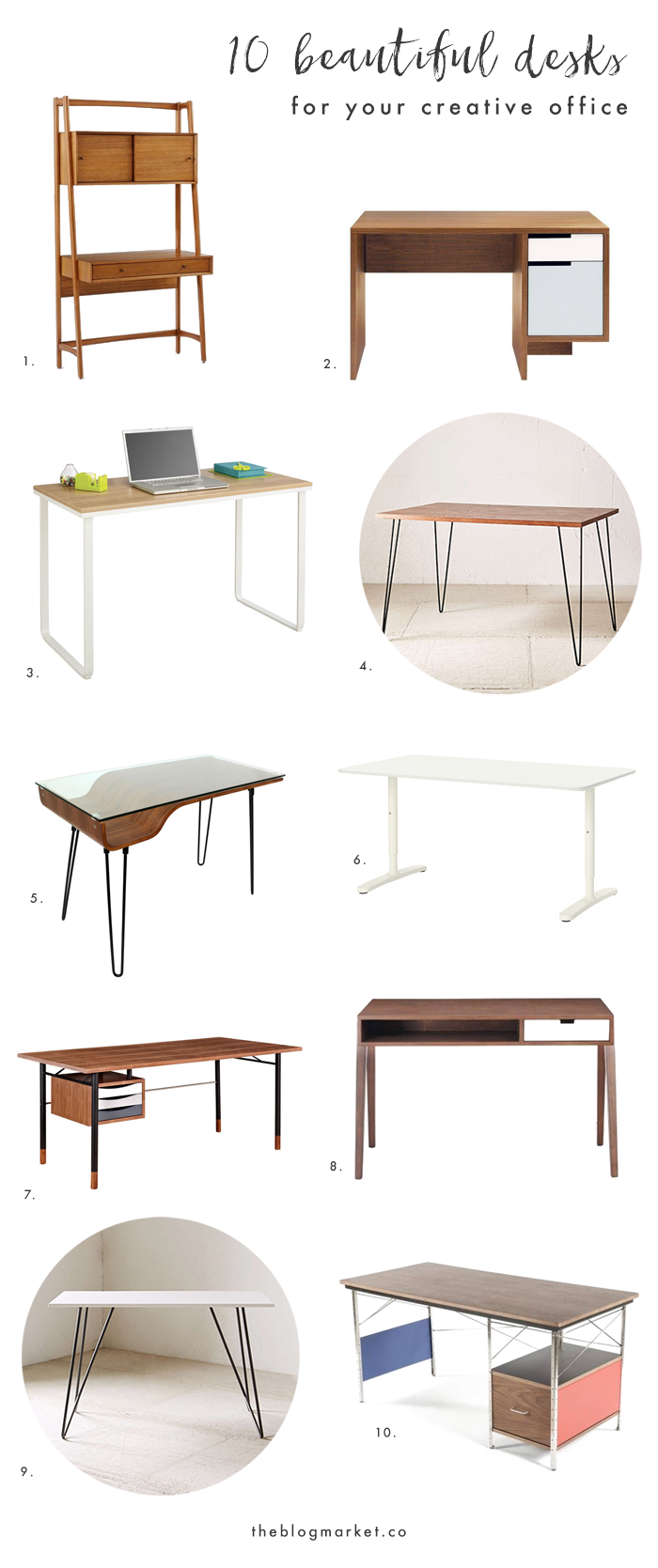
10 Beautiful Desks for Your Creative Office

April 20, 2016 by jennifer Leave a Comment

A couple months ago, I moved into a larger home and was so excited to create an actual office area either in my bedroom or in the living room. So, I went to Ikea to check out their desk selection and ended up bringing home a cute little gray/wood laptop table. It was tiny. Definitely the kind of desk that’s perfect for an elementary school student but not so great for a 25 year old messy crafter and blogger. I didn’t even think about how impractical this desk was until a few weeks later when I realized I was never going to sit at it. Obviously, I need to work on my bad habit of buying things simply because they are cute.

Anyway, the tiny desk is still in my room but eventually I’d love to invest in a much larger desk. Even a big white folding table could work for me. After scouring the internet for desks over the past couple of days, these are my top ten favorites:

10 Beautiful Desks for Your Creative Office | The Blog Market

1. Mid-Century Wall Desk | West Elm
2. Modu-licious Deskette | Domino
3. Writing Desk | AllModern
4. Finley Hairpin Table | Urban Outfitters
5.  Collette Desk | Dot & Bo
6. Bekant White Desk | Ikea
7. Gradient Desk | Dot & Bo
8. Linea Desk | Domino
9. Metal Tubing Desk | Urban Outfitters
10. The Case Study Desk | Domino

If I could start over and buy a practical desk, it would probably be something similar to #4 or #9. Time to start saving!

What does your ideal office desk look like? Any tips on where I can find some good ones?

Leave a Comment

  • Newer Posts
  • 1
  • …
  • 48
  • 49
  • 50
  • 51
  • 52
  • …
  • 99
  • Older Posts

Recent Posts

  • Easy Ways to Add Greenery to Your Workspace
  • How to use Pinterest board sections to get organized + stay inspired
  • Friday Favorites 05 | Terrazzo Trend
  • Best Creative Planners for 2020
  • 10 Journal Prompts for Creative Motivation

Recent Comments

    © 2018 The Blog Market · · BACK TO THE TOP