The Blog Market

  • Home
  • About
  • Resources Directory
  • Advertise With The Blog Market
  • Contact Us

6 Social Media WordPress Plugins We Love

May 1, 2015 by jennifer Leave a Comment

One of the things that first attracted me to WordPress was the fact that I could use plugins. It’s pretty awesome that even if you don’t know anything about jQuery, JavaScript, or other fancy coding languages, you can still use professional features on your blog. When used thoughtfully, WordPress plugins can make a website extremely user friendly and generate a bunch of traffic as well.

Social Media WordPress Plugins | The Blog Market

1. Font Awesome Icons. These are icons that you can use on websites or in Photoshop that are actually font-based. While you can use them on any platform, WordPress has a plugin that makes it really easy to display these icons throughout your site.  I love having font-based icons because they’re super clean, never fuzzy, and you can change up their colors on a whim without uploading images. Check out the Font Awesome Cheatsheet here.

2. Sharing Plugin from Jetpack. This is an option that you can find within the Jetpack plugin (which I highly recommend exploring). We finally added these share buttons to our posts this week! I think this is the best sharing plugin because it includes several social options and with a little CSS, it can blend in perfectly with your brand.

3. Pinterest RSS Widget. This is the cleanest Pinterest widget I’ve come across yet. I appreciate how it can blend in with almost any brand without looking out of place or distracting. Formatting this widget requires a little CSS sometimes, but not much. Take a look at our sidebar to see how we use this plugin!

4. jQuery Pin It Button for Images. This plugin allows you to add and customize a Pin It button that will appear when people hover over your images. You can keep it simple with a text-only style or you can get more decorative and upload a graphic. It’s an amazing way to get your photos pinned and it also adds something interesting to your design.

5. Recent Tweets Widget. We don’t currently use this plugin but love how simple it is! It displays your tweets in a list with that little bird icon and no extra frills (unless you want them). If we end up using a Twitter plugin in the future, it’ll probably be this one.

6. Instafeed. Here is another plugin that we don’t currently use but have tested and really like! The photos link directly to Instagram which is a great alternative to Snapwidget (although their layout options are amazing). The thumbnails on Instafeed will automatically appear in a vertical list, but you can use a little CSS float:left; action to get them to into a grid.

Let’s keep this list growing! Add any of your favorite WordPress social media plugins in the comments. 🙂

Leave a Comment

DIY Your At Home Photo Studio Pt. II – The Camera

April 29, 2015 by jennifer Leave a Comment

Last week, I talked about how I make the most of lighting, and now we’re on to the equipment. I’ve seen so many posts about photography over the last few years, but most of the time I couldn’t take the advice because I didn’t have over $2,000 to spend. For blogging purposes, I prefer (and so does my wallet) to keep my equipment stash fairly small, and as efficient as possible! So, here’s what I use, if you care to know! CAUTION: This post is LONG.

Best Cameras for Blogging / Affordable dSLR Cameras^ When I don’t have my camera or phone = grainy photos. 

The Camera

I recently bought a Nikon D5300. Before, I used a Nikon D40 for about 6 years (which I’d still have if I had taken care of it). It was the BEST deal on a good camera. Though I’ve used Canons a couple times, I’m comfortable with Nikon and it’s almost always more affordable. In my opinion they’re also easier to use. Jennifer uses a Canon and loves it, but she had to invest a lot more initially, so keep that in mind if you’re on the lookout for dSLRs!

My suggestion for an affordable camera? Buy the body only. It’s cheaper and if you want a really good lens, skip right past the kit. I didn’t do this the first time and ended up never using the kit lens. Instead, I purchased the Nikon body for $650, and invested in two nicer, different lenses right away (notes below), that I actually use. There are also bundles that can save you $, but after researching, I learned that this was the best route to get the right lenses.

If you’re on the lookout for a camera, take other opinions (like mine) into consideration, but make sure not to just go with what one person says. Photographers don’t all use one brand, so don’t feel like you have to go with anything specific, just what will work for you.

The Lenses

Nikkor 55-200mm zoom lens: $150 The first lens I ever got aside from the kit lens. Perfect for both portraits + nature, that’s what I took photos of most of the time, so it was ideal. Since upgrading to the D5300, I’ve got two new ones, but I still love this one overall. If you blog about travels or adventure, I definitely suggest it, but this lens is also an option:

Sigma 18-250mm lens: $290-$400 You can grab this for Nikon or Canon. I purchased it because it has great reviews as a walkabout lens, which literally is what I do all the time (haha). I wanted to walk around, zoom in on something I saw, snap photos, etc. But I also wanted to zoom out to photograph Etsy stuff or DIY, so it had to be a wide range. While this is a good go-to, I actually use the 50mm below more for blogging because the lens creep on this one is REAL, making it somewhat annoying to take flaylays and such. Plus it’s heavy. Still, if you want a huge range all in one lens, this is an option.

A 50mm f/1.8 lens: $100-$200 Perfect for portraits, the 50mm lens is my go to most of the time. I’m obsessed with the lighting and clarity the Nikon version provides every damn time, on automatic, and Jenn loves her Canon equivalent. Even though I always have to stand on a chair when I use it for blog photos (like the one featured here), the result is so amazing I don’t even mind. If you style blog or have people in your shots a lot, this one is a must too.

I was able to get the perfect camera kit for me by buying the body + two lenses for a total of $1350. For blogging, I’d be totally satisfied with just the 50mm, in which case I’d have my tools for under $1,000. If you’re on a budget but won’t compromise quality, I do suggest this! But, there’s one other FAB budget friendly option for blogging cameras… The iPhone 6!

The Phone

iPhone 6: I can’t speak for the 5, as I owned the 4 before this, but I’d have never taken blog photos with a phone before I got the 6. I bought it last fall because a new camera wasn’t in the budget and I needed one for work. I was submitting articles and not getting good photos to go along with them. This saved me! Plus, I went on a road trip to Big Sur right after purchasing and am beyond happy because I got wonderful photos from it. The only thing I took my SLR out for (which at the time was falling apart) was to use the 200mm to whale watch. I don’t exactly understand why, but iPhone 6 is amazing at landscapes. I always take it out at the beach. As far as blogging, this is pretty much all you need, though you will have to sacrifice zoom for the most part. Having all the above is better, but there are a ton of bloggers that use iPhone only and if you’ve got a good eye for composition, know how to work with lighting, and work to get that amazing shot, the iPhone 6 is a perfect investment to have all your tech in one place.

Going on 900 words here, so I’m going to stop! What’s been your biggest photography investment? For those of you on the fence about equipment, I hope this helps!

Leave a Comment

Weekly Resources | Social Media

April 24, 2015 by jennifer Leave a Comment

Good morning! How is this month treating you? Any new blogging or business ventures? I’ve been working on a design studio and I am anxious to get it launched already. Apparently there’s this nit-picky perfectionist inside of me who needs to keep working on the details for a while longer. 🙂

If there’s one blogging practice I need to work on a little more, it’s engaging in social media. I tend to use it for personal reasons more than business-y reasons. This week I gathered up some tips that are inspiring me to be more intentional with social media as it relates to blogging and business.

Social Media Resources for Bloggers | The Blog Market

1. The Well has a detailed guide to organizing your social media. They cover several topics including studying analytics and scheduling your posts. Super helpful! There’s a free downloadable workshop in there too.

2. I’m one of those people who rolls her eyes at Facebook but secretly finds it really helpful. This year I’ve joined a couple of Facebook groups for entrepreneurs and I’ve made amazing friendships and even business connections! Here is a lovely post by Nesha Designs about how you can get clients from Facebook groups.

3. Amber wrote an awesome post about writing the perfect social media bio! It’s always so much more difficult to write than you’d think. And so awkward! Amber includes a simple list of questions to answer in your bio. Going to be using these for sure.

4. Love these tips from Chloe Social about having consistent branding throughout your social media accounts. So spot on.


Enjoy these reads and have a happy weekend!

Leave a Comment

DIY Your At Home Photo Studio Pt. I – The Lighting

April 21, 2015 by jennifer Leave a Comment

Photography and lighting in particular are quite the hot topics in blog world. This didn’t matter so much back in the day, but now your photos make or break you, whether or not you do it for business or pleasure. Sad day for those who dislike being behind the camera! I’ve always experimented with photography as a hobby but never did I think one image would be so important. All this has been on my mind lately as I just moved into a new apartment and I *officially* have an office space! It’s more of a dining space turned pseudo-creative studio but I think you get how amazing this is to a crafty girl slash freelancer. What’s more, it is filled with tons of glorious natural sunlight. Swaths of it, even. (If you’ve apartment hunted in Los Angeles you know how this not only rarely comes along but it’s extra rare to be in a normal person’s price range. Whoo hoo!) All this has me thinking back to oh, three weeks ago, and the past six years of blogging in the most makeshift of studios.

How to Take Better Blog Photos / Photography Tips

Before, I had no lighting, no space, not the best camera, and a lot of other factors making it really difficult to take blog or Etsy or DIY photos—which made all those things not so fun. Googling “DIY photo studio” usually brings up a list of bloggers who suggest studio lighting, multiple lenses, etc, basically things that add up, all to create ideal conditions for those coveted blog photos. All that is really amazing and aspirational and we all want to get there one day, I feel like it can’t be realistic for everyone, especially those just starting out. So consider this little three part series for those of you in the interim–you’ve got a bedroom, maybe; perhaps even a little corner by a window, but not much else. Here are a couple of shortcuts in the lighting department, that always helped me get by:

You can’t fake natural light

From living in dorms to basement apartments to my last place that got no light at all, I’ve somehow always ended up in places that hide from the sun. If you like the look of most successful lifestyle/design blogs’ photos, you really can’t go without it, but you can:

Chase the light. Tweak your schedule if possible. Even when I wanted to shoot in mornings, I usually needed to wait until the afternoon to get any sun. So I did all my other work during the morning, prepped, and shot around 3 pm when I had photos to take. If I had work or school, it definitely meant planning for the weekends. I tend to make Sunday a shooting day.

Set up outside. People are wary of this because direct sunlight is just as bad as none at all. But if you don’t have much light inside, chances are your office or home is fairly out of direct sun too. I’d bring my paper, camera, and subject right outside my front door or on my balcony to shoot. It can be a pain but I’ll cover how to quickly set up your “studio” later on!

Make the most of your sliver of sunlight

Switch up your angles. Lots of people advise to find a window to shoot by. Totally agree, and I’d add to make sure you’re testing a photo from every angle. One way to guarantee the best shot is to take photos of the same item while you physically rotate–take a photo, then a step, then a photo, etc., then review them to really get a visual for the best spot to stand and shoot.

Switch up your devices. I have my Nikon dSLR, a few fairly basic lenses, and an iPhone 6. There has actually been a surprising amount of times that I’ve chosen the phone. Sometimes it works better in low lighting and making the most of what’s there; sometimes it just means I don’t have to spend time messing with the settings on my camera while the light fades away. Hey, whatever saves time.

Where’s your shooting spot? Do you have a home office, studio, nook? Do tell!

I’ll be chatting about equipment of the inexpensive variety next week.

Leave a Comment

Weekly Resources | Branding

April 17, 2015 by jennifer Leave a Comment

Whether you’re talking about brand marketing, brand identity design, or brand strategy, branding is the name of the game these days. Especially in here in the blogosphere. I used to pay no attention to my “brand” and what it all meant. I figured I just ran a blog, not a business. But now I wholeheartedly agree that branding one of the key stepping stones in turning your blog into a business and attracting your ideal clients.

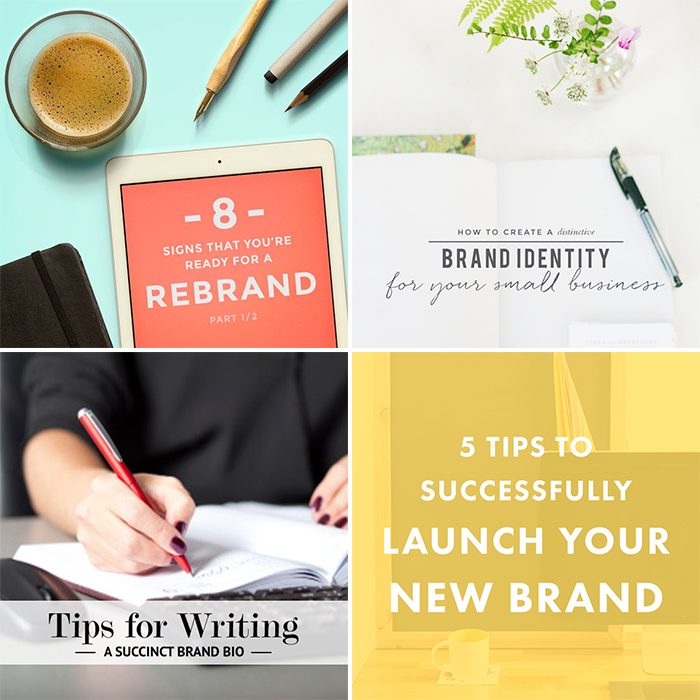
Branding Resources for Bloggers | The Blog Market

1. All businesses grow and develop overtime so a rebrand is usually inevitable. Visit the beautiful Go Live HQ for 8 signs that you’re ready for a rebrand (part 1 & part 2).

2. Have you seen that shirt that says “All Blogs Post the Same Stuff.” Sometimes that feels so spot on. Without carefully branding, blog designs and content can start to get monotonous. Check out this post on creating a distinctive brand identity by The Brand Stylist.

3. Simple and straightforward lists are my jam. Maya Elious is sharing 5 great tips for successfully launching your new brand on The Nectar Collective!

4. Can we all agree that writing a bio is the worst? I love these tips for writing a succinct brand bio over on Levo. Happy to have found this post.

Would you agree that branding is the backbone of your business?

Happy Weekend! See ya next week.

Leave a Comment

Weekly Resources + Giveaway Winner

April 10, 2015 by jennifer Leave a Comment

I had lots of fun scouting out blogging resources this week! There is so much informative content out there. Here are my articles of the week:

Resources for Bloggers | The Blog Market

1. Last week on A Beautiful Mess, Emma shared ways to self-promote without being annoying. Self-promotion can get over the top real fast. Loved reading this honest advice.

2. You may already know about this, but starting April 21st, Google will be using mobile friendliness as a factor in search engine rankings. This post on Free Borboleta shares easy ways to see if your website is responsive or not. I’ve been fighting against mobile responsiveness for so long because I prefer the desktop view on most of my site designs. But what can ya do?

3. Amber of Ember + March has an awesome list of 10 affordable investments for bloggers. “Affordable” being the keyword. #10 is my favorite on the list. Go check it out!

4. So thankful for this list of six marketing tools by Chloe West on Kory Woodard’s blog! I love Canva, but I haven’t tried the other five tools. Guess I have some work to do.


Lastly, thank you so much to everyone who entered our Spring Giveaway. The lucky winner is Mary L Hunt! We’ll be emailing you today to get your shipping address. Congrats! 🙂

Leave a Comment

  • Newer Posts
  • 1
  • …
  • 23
  • 24
  • 25
  • 26
  • 27
  • …
  • 29
  • Older Posts

Recent Posts

  • Easy Ways to Add Greenery to Your Workspace
  • How to use Pinterest board sections to get organized + stay inspired
  • Friday Favorites 05 | Terrazzo Trend
  • Best Creative Planners for 2020
  • 10 Journal Prompts for Creative Motivation

Recent Comments

    © 2018 The Blog Market · · BACK TO THE TOP