The Blog Market

  • Home
  • About
  • Resources Directory
  • Advertise With The Blog Market
  • Contact Us

Quick No-Design Ways to Update Your Blog

June 11, 2015 by jennifer Leave a Comment

I’m a little all over the place this morning. For some reason I thought this would be a quick post to write. It says no design right? Yeeeahhh. So, sorry in advance if it seems like I’m throwing info at you all at once. At the same time, all these little details are great ways to give a blog a quick update without having to worry about a new design or learning how to code.

Even with all of Jennifer’s helpful coding tutorials, it still takes me an unnatural amount of time to make updates to my blog. Some of us are just like that, I think! So even though I have a long list of design tweaks I want to implement at some point or another, there’s also tons of little things that don’t require an entire website rebuild or even any coding at all—that I can do to give my blog a facelift when needed. Realistically, I recommend checking in with all of these every few months or so to keep things fresh. Time flies and it’s easy to look at our blogs 6 months later and realize there’s a ton of outdated things on display for all to see. Here goes.

Quick No-Design Blog Upgrades | The Blog Market

Update Images & Links

Possibly the most time consuming of all design-less tweaks, but totally worth it, is updating images. This means going through post by post and making sure each image is exactly what you want now. (To save time by just go through the popular posts or a few that have great written content that maybe didn’t come through in the image.) If you’re using different fonts than you were before, you can change old text on images to be consistent (hopefully you saved PSDs!). If relevant, make sure everything is titled correctly in WordPress, or at least make sure to reupload with a good, SEO friendly title. Also—if you’re on WP, it’s good to make sure each post has a feature image! And if you want to optimize them for Pinterest, make sure you’ve got a vertical image for readers to pin (might be a good time to upload a new one!). This goes without saying, but if you come across errors, pixelated images, or ones that are the wrong size of your current blog width, those should be a priority! While you’re going through, this is a good time to check on your links. Click each link to make sure it’s not broken/inactive and add links to old posts if you have since created fresh content on related topics.

Clean Out Sidebar & Navigation

I am guilty of this. I’ll implement something on my sidebar and just… forget about it. Actual example: My blog’s sidebar right now! I’ve been meaning to update the popular posts slider on my sidebar forever, but instead there’s just a link to these posts I’m not even promoting at the moment. This is the type of thing that if I just cleaned it up and gave it an update, would make my blog look so much better. Another example is if you created categories for your navigation menu and stopped using those. Whether you’re in blogger or WordPress, you don’t need to know any coding to go in and change categories. Take a moment to click on each, make sure you still use it, and get rid of it if you don’t. Then, scroll through each and make sure you actually want each post in that particular category—stuff happens. It will make navigating your site so much easier.

Tags, Titles, & About Page

Now that you’ve updated the visual content of your blog, it’s time to move on to the written. It’s so hard to remember to update your about page. I realized I needed an update when it had my age wrong! That’s how long it had been—a birthday had gone by. We all live and learn a lot over just a few months so there’s usually at least some update to be made in the bio department.

It took me awhile to really figure out how to use tags properly so when I got better at it, there was a lot of old content that was either missing tags completely or could’ve made better use of them. So it’s never a bad idea to quickly go through and make sure your tags actually help readers find your blog posts. While you’re in the posts, you can check on titles to see if they need anything. I like to keep titles short and sweet on my blog because it looks better with my design, so sometimes updating a title just means coming up with something catchy, but also clean.

Okay, that’s all I’ll say on this subject for now. There are lots of other ways to keep your site in tip-top shape in between any design tweaks you do, from updating SEO to keeping your branding consistent. But it shouldn’t be a stressful, all consuming thing—hopefully you can make updates every now and then without having to set aside too much time at once.

Leave a Comment

Top 10 Photoshop Tools for Blogging

June 9, 2015 by jennifer Leave a Comment

Out of all the programs out there, Photoshop is the one I use most often for blogging. I use it to edit photographs of course, but it also helps me create post graphics, photo collages, blog design mockups, color palettes, and so many other things. While most of the tools in Photoshop are extremely useful and important, I want to highlight the top ten tools that make blog-preparation easiest for me. Each tool in Photoshop has a shortcut that makes it really easy to switch back and forth between tools. Yay for time savers!

Top 10 Photoshop Tools for Blogging | The Blog Market

1. Move Tool (shortcut: V) – I know, I know. This one is a no-brainer. Moving things around in Photoshop can feel tedious at times though, like when you’re having to switch back and forth between tools. Clicking “V” on your keyboard makes the whole process so efficient. When the Move Tool is selected, you can also use the arrow buttons on your keyboard to move objects around.

2. Crop Tool (shortcut: C) – This is another obvious go-to Photoshop tool. When making collages, I always use the crop tool to figure out my ratios, make photos square, etc.

3. Paint Bucket (shortcut: G) – Does the paint bucket icon make anyone else super nostalgic? Brings me back to MS Paint days. In Photoshop, this tool shares a shortcut with the Gradient Tool as well. Both are perfect for blog post graphic backgrounds and mood boards.

4. Type Tools (shortcut: T) – Normally, you’ll probably be using the default Horizontal Type Tool but every now and then it’s fun to experiment with Vertical Type or Type Masks. I talked a little about how Type Masks work on my tutorial on creating gold leaf hand lettering.

5. Shape Tools (shortcut: U) – Rectangles, circles, hexagons, hearts… you can do it all. Remember to hold the Shift Key down if you want to keep an even ratio!

6. Eyedropper (shortcut: I)  – When you click part of an image with the eyedropper tool, you can find the hex color code, along with all the RGB/CMYK info. This is how beautiful color palettes are made. 🙂

7. Magic Wand (shortcut: W) – One of my favorite tools ever! The Magic Wand Tool allows to you quickly select all similar areas of an image or graphic. So if you have a really contrasted image (ie. a dark product on a light background), you can click the background with the Magic Wand, and edit that part of the image only. This is a great tool for erasing backgrounds when you’re making product collages for your blog. I wrote a little more about it in this post.

8. Magic Eraser (shortcut: E) – This tool goes hand in hand with the Magic Wand. It allows you to erase large similar areas of an image or graphic quickly in one click.

9. Background Eraser (shortcut: E) – Another great variation of the eraser tool.  I don’t use this one a lot but it can be helpful in erasing tricky backgrounds. It works like the regular eraser tool but is a little slower and staggered. It recognizes the contrast between the object and the background.

10. Spot Healing Brush (shortcut: J) – When I first started using Photoshop, I thought this was the coolest thing. It makes little imperfections just disappear. I’ve used this tool for all sorts of reasons. To remove dust on a photo of my computer. To remove blemishes from photos of my face. To blend textures together to create repeating backgrounds. Love this thing.

Do you have any favorite Photoshop tools for blogging that I didn’t list? Always up for learning new tricks.

Also, would any of you be interested in posts on Illustrator?

Leave a Comment

Weekly Resources | For Blogger Users

June 5, 2015 by jennifer Leave a Comment

Alright, Blogger people! This roundup of resources is for you. A couple weeks ago, we shared our favorite WordPress resources but today I want to focus on good ol’ Blogger. I will start by saying that I really like Blogger. I used it for several years – while I was pretty much journaling to nobody, when I began sharing more curated posts and DIY projects, and during the time that I was learning CSS. If you feel comfortable coding, you can really transform your blog design to not look the same as everyone else’s Blogger blog. The fact that it is still free is a really big selling point too.

Blogger Platform Resources | The Blog Market

1. Jessica from The Blogging Brew shared this awesome tutorial on how to create a drop-down navigation menu on the Blogger platform. It’s not as drag-and-drop easy as WordPress makes it, but it’s definitely simpler than one might think!

2. It seems that everyone in the world is migrating over to WordPress, but honestly sometimes Blogger is where it’s at. This post by Blog Brighter compares WordPress with Blogger, sharing how Blogger might be the right platform for some folks.

3. During the time that I used Blogger, I don’t think I knew anything about SEO. The SITS Girls shared their top 5 SEO tips for Blogger, and it’s such a great resource!

4. Using Rich Pins has become a staple of any blogger who wants their pins to bring traffic back to their blog. Here’s a useful post by Free Borboleta about setting up Rich Pins for both Blogger and WordPress platforms.

Want more blogging resources? Check out our full archive here!


Leave a Comment

10 Inspiring Blog Posts on Self Employment

June 3, 2015 by jennifer Leave a Comment

Branding. Blogging. Taxes. Finding inspiration. Now is probably one of the best times to chase your small biz dreams–there’s advice everywhere. For this mega-resource list, however, I was looking for something specific. I wanted to get at the experience of being self employed (whether a creative business owner or freelancer or whatever). See how people got there. What’s it like to be at home all day? What are the struggles people don’t admit to? As much as bloggers talk about things like building a brand or working from home, a lot of the day-to-day experience is lost in favor of spilling success secrets and telling you what you should or shouldn’t do. That’s helpful but when I began freelance blogging, I scooped up personal stories every chance I could. I checked in at Design Sponge and The Everygirl for career profiles whenever I had the chance, and bookmarked bloggers posting their own timeline and scheduled on their blogs. And it helped so much. So that’s how this roundup was born. I’ve had some of these posts bookmarked for months, and some I came across in my research. Whether or not you’re going at x creative pursuit full time or thinking of one day quitting that 9-5, articles like these will be your best friend. Even if you just read one per day for 10 days (perhaps as part of a month of reading blogs?), you’ll get inspired and start generating ideas for your own plans.

10 Inspiring Blog Posts on Self Employment | theblogmarket.co

1. Allyssa Barnes’ post on the benefits of creating a daily schedule will give you insight on a designer’s daily schedule and hopefully inspire your own. Even if your schedule varies from day to day, it’s nice to find a way to get in a rhythm.

2. Speaking of daily schedules, here’s an oldie but goodie! This Meroe weekly freelance schedule may be the first post I pinned when becoming a freelance writer. Everyone’s schedule is different, but reading posts like these really help you decide how to allocate your time. There are so many ways to be efficient as a freelancer.

3. Sometimes “I am my own boss” comes off as “I don’t have to work” to others. I wish more posts like Olive & Ivy’s things I wish people knew about being self employed existed to offer an honest perspective on the upsides, and yes, downsides of being on your own!

4. Along the same vein, it’s so great to see successful women reflecting on their past biz and career choices and offering words of wisdom. Abagail of think creative let readers in on the 10 biggest business mistakes she’s made and what she’s learned.

5. If you’re just starting out, check out this post by Allison Adams on successfully working from home. It basically has everything you need to get in check mentally, such as managing schedules and your workspace, and getting dressed up–even if you’re not leaving the house.

6. Crafty business owners, do you follow Craftsposure? It’s a great resource, and I love this post on how to punch fear in the face. I seriously recommend bookmarking it and quickly running through it whenever you’re paralyzed with self-doubt (which can be often). It’s a no-nonsense, inspiring way to get past fear.

7. Nesha has learned a lot over 3 years of freelancing. If even just a few of those apply to you, you’ll be better off. Her points about making friends, making passive income, and booking your clients far in advance are so, so spot on.

8. This advice from Designer’s Guidebook applies to anyone who works remotely, ESPECIALLY if you’re an introvert like me. It’s all about the process of making designer friends online and has a bunch of good tips that, like I said, can span social media, freelance writing, and other internet-centric fields.

9. A lot of times it seems like bloggers don’t want to let us in on how they got where they are, just that they’ve arrived. Thankfully, there are ladies like Lindsay from White Oak Creative who aren’t afraid to share how they became a freelancer.

10. Megan at The Fresh Exchange shared a post called how to be successful a few months back and while it doesn’t strictly apply to those who are self-employed, I think it’s a great reminder that YOU define success, it doesn’t define you.

It’s so important to hear other people’s stories, especially when heading out on the path less traveled! It turns something potentially isolating into an exciting community. I’d love nothing more than to add to this list, so if any posts came to mind while reading, do share! Think back to your bookmarks and Pinterest boards.

PS: Why not blog about your journey? Early this year, I blogged about the ups and downs of working from home. It’d be great to see some other perspectives.

Leave a Comment

June Calendar Desktop Download

June 2, 2015 by jennifer Leave a Comment

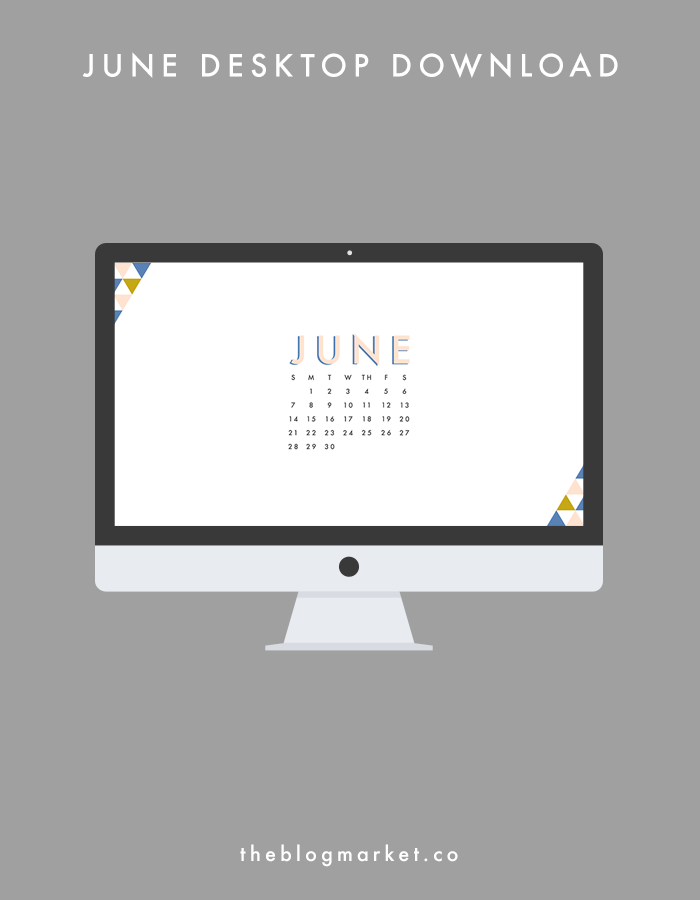
Hey guys! It’s JUNE! Like Angela, I’m completely weirded out that it is already the middle of the year. But I am so, so excited. Summer is coming. Thank goodness. Do you have any fun summer plans? My main goals are to keep exploring Oregon and to keep making things. Working on TBM is also going to take up lots of summer days and I’m looking forward to it so much! Just wanted to say another thank you to those of you who filled out our reader survey. We’ll keep it open for another day or so – click here to participate!

Alrighty. I decided to go geometric and bright for June’s desktop. Click the link below the photo to download. 🙂

June Desktop Download | The Blog Marketdownload this desktop!

Have a great week! I’m currently working on Photoshop tutorials, so let me know if there is anything you’d like me to add to the list.

Leave a Comment

  • Newer Posts
  • 1
  • …
  • 82
  • 83
  • 84
  • 85
  • 86
  • …
  • 99
  • Older Posts

Recent Posts

  • Easy Ways to Add Greenery to Your Workspace
  • How to use Pinterest board sections to get organized + stay inspired
  • Friday Favorites 05 | Terrazzo Trend
  • Best Creative Planners for 2020
  • 10 Journal Prompts for Creative Motivation

Recent Comments

    © 2018 The Blog Market · · BACK TO THE TOP