The Blog Market

  • Home
  • About
  • Resources Directory
  • Advertise With The Blog Market
  • Contact Us

Do You Need a Separate Instagram For Your Blog?

March 8, 2017 by jennifer Leave a Comment

Happy Wednesday! Thanks to everyone who comments and leaves feedback for us! We love to hear how our tips have helped you create blogs you love. We’re brainstorming how to better share all the work you’ve done with your own blogs. If you have a big project that you’ve completed using tips from us, please feel free to share! One question we receive on our social media posts is whether you need a separate Instagram account from your personal to promote your blog?

Do You Need a Separate Instagram Account for your Blog? - The Blog Market

There are so many ways to go about social media for your blog that it won’t take long to find what works for you. There are benefits and drawbacks to both. We have a separate account for this blog. We did this for a few reasons: we were new so we really wanted to establish brand awareness. We had a color palette, logo, design, and content worked out, and it just made sense to translate that to Instagram, despite each of us having our own accounts. It ended up being a HUGE plus! It drives traffic and gets our name out there, and the best part is it wasn’t something that took a ton of time. We post a few times a week and the only requirement for us is that we promote our blog posts, stick to a theme, and utilize proper hashtags. Other than that, the account doesn’t require much maintenance.

However, we have enough content to keep the Instagram fresh. If you only blog once a week, you might not have much content to post on your accompanying account. Even if you have images to post here and there, it’s tough to consistently come up with content. I’ve worked on a lot of other accounts and unlike TBM, most require more frequent and consistent posting to grow, so if you choose to create a separate account, you should be aware of the possible commitment.

Another thing to consider is what you already post on your personal account. If it has little to do with what you blog about (say you love posting photos of your cats but you love blogging about beauty products), it makes more sense to keep the two separate. Otherwise, you’re trying to market beauty blogging to followers who are either your personal friends or cat lovers, and they likely don’t care to click over too much. But this doesn’t mean you should never post about your blog on your personal. A perk to having separate accounts is that I have more places to share. When we have a post that my personal followers would like, I go ahead and post it! There’s no reason not to occasionally cross promote.

So you might be wondering if I’m saying that you should definitely have a separate account? Nope! There ARE ways you can stick to a personal account and still grow your blog and social media presence. It all goes back to whether it lines up with your blog’s content/readership. My personal account is very lifestyle focused. I make sure to always upload high quality photos, stick to a theme, etc. So even though it’s “personal” I prefer to run it like I would a blog account. I refrain from posting selfies (I save it for Snapchat, okay!) or dark, grainy photos. So when it comes time to promoting my work, it doesn’t feel off-brand. The same followers that follow me are curious as to what I’m blogging about, too.

A lot of times lifestyle influencers, fashion bloggers, and those whose blogs are their brands will stick to one account and just make sure it’s very curated. This is the most successful way to get around having to create a separate account for your blog, but it doesn’t work for everyone. If you don’t want to have to limit your personal content, I’d say to create that second account. It’ll be freeing to know that you don’t have to make your personal posts live up to your polished, edited blog content. As much as I love having a pretty Insta, sometimes I really do wish I could just post *whatever*!

Ah social media, what a crazy world! Do you have more than one Instagram account?
Leave a Comment

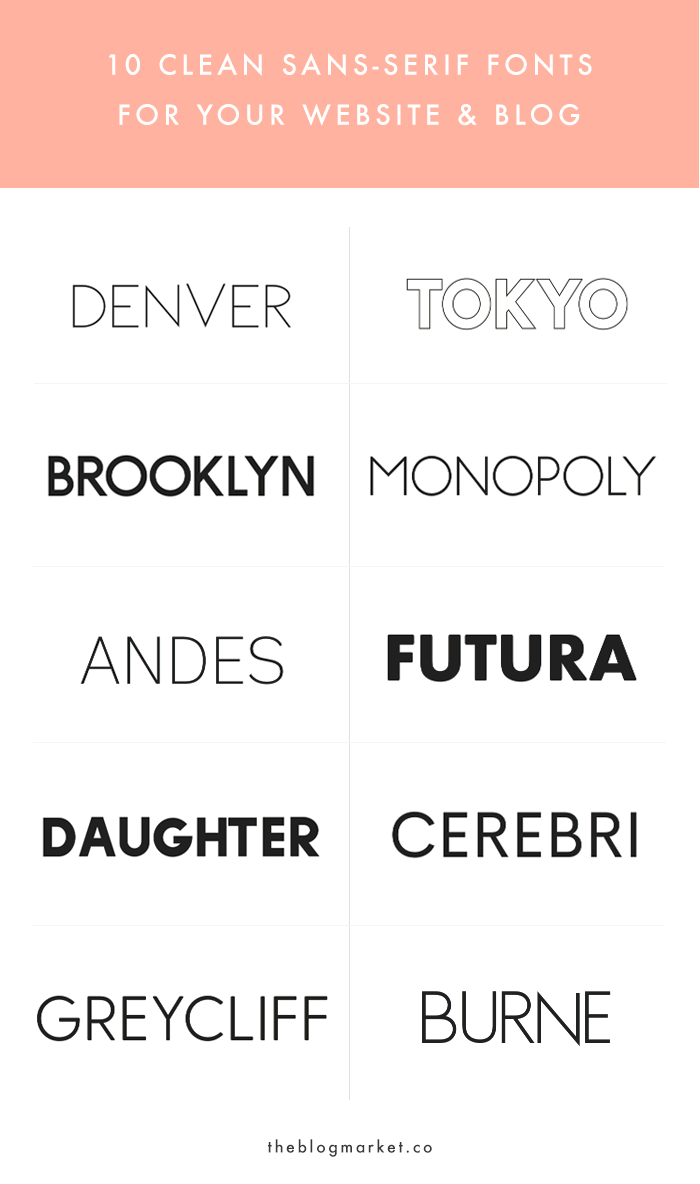
10 Crisp & Clean Sans-Serif Fonts For Your Blog

March 6, 2017 by jennifer Leave a Comment

Hello! Hope you all had a nice weekend. We’ve both been working on updating our personal websites, and choosing new fonts is always an inspiring part of the process. We really love seeing websites with nice, clean sans-serif fonts for logos, headings, etc. A few years ago, I chose a variation of Futura for my website branding and I never looked back. We now use it for The Blog Market’s branding, and it’s the best! More recently though, I have come across all sorts of new sans-serif fonts and I definitely have some new favorites. Aside from Google Fonts and Adobe Typekit, we’re constantly using Creative Market to find pretty fonts in all different styles. Usually they’re very affordable, which is always a plus. Most of them can be downloaded as desktop and/or web fonts. Here are our top ten  favorite sans-serif fonts from Creative Market!

1. Denver | A Romantic Sans Serif
2. Tokyo | A Designer Font Duo
3. Brooklyn | Two Weight Font Family
4. Monopoly Font
5. Andes Family
6. Futura Round Bold
7. Daughter Font
8. Cerebri Sans
9. Greycliff CF: geometric sans font
10. Burne Book

Which is your favorite from the list? I’m thinking about using Brooklyn for future projects. In addition to having a solid sans-serif font for branding purposes, we think it’s fun to add a cute handwritten font to the mix. If you’re in the market for something fancy, check out our top ten whimsical script fonts. 🙂

Leave a Comment

Weekly Resources | Quick & Easy Ways to Update Your Blog

March 3, 2017 by jennifer Leave a Comment

Today’s resources are all about improving your blog even if you don’t have tons of time to dedicate. I think we’ve all had times that we can’t really post as much content as we want or dive into our social media. But you don’t have to completely abandon ship, even during busy times or blogging breaks. Hope you’re as an inspired as we were by these quick updates!

Quick & Easy Ways to Update Your Blog

1. These 10 minute blog activities by Nellie & Co are easy ways to grow your traffic or social media channels when you’re super busy.

2. To the veteran blogger, these 6 things that should be in every blog post may seem basic, but sometimes the simple things are the most effective. If you haven’t been doing these, don’t be afraid to go back and update old blog posts to be more effective!

3. Nia Logique posted a huge list of super quick tips for creating eye-catching Pinterest images, and she included examples of what and what not to do. Pinterest is one of our biggest traffic sources, so we definitely suggest optimizing your photos for this platform!

4. Brittany Berger shared 6 forgotten ways to clean up your blog. Why not pick a few and make it a goal for whenever you find a few free minutes next week?

Do you have any tips for improving your blog without spending hours working on updates?

Leave a Comment

March Calendar Desktop Download

March 1, 2017 by jennifer Leave a Comment

Spring is on its way! We can’t tell you guys how excited we are for this upcoming season. Portland has been very gloomy, and I know an extra hour of daylight will make a huge difference in my productivity and overall mood. It’s easy to hibernate during winter, particularly for those of us who work from home and don’t necessarily need to get outside. Also, I’m already planning spring inspirational field trips to nearby peony farms. The blog world is about to blow up with peony photos and I’m not mad about it.

As far as TBM goes, Angela and I have been having some huge brainstorm sessions lately, so we already have a lot of posts lined up on our editorial calendar (tutorials, roundups, blogging advice, you name it). If you’re not already, follow us on Bloglovin’ or Instagram to stay in the loop!

For our March desktop download, I went crazy with these beautiful navy and blush watercolor flowers that I found over on Fox + Hazel. Aren’t they so pretty? I wish I could watercolor this well, but I’ve gotta leave it up to the experts. 🙂

March Calendar Desktop Download
(click to download)

Want to download these watercolor flowers for your own personal projects? Click here!

What do you have going on this month? Are you as excited for springtime as we are?!

Leave a Comment

5 Ways to Get the Most Out of Facebook Groups

February 28, 2017 by jennifer Leave a Comment

We haven’t covered Facebook groups too often here on TBM, and that’s because for awhile I had just one group I actively engaged with, and it seemed a little overwhelming to join many more. These days I’m in four or five groups, with two I stay pretty current on. I found that there are certain ways to make the most out of these groups so they don’t just become more  status updates clogging your feed, and actually provide inspiration and opportunity to me as a blogger and freelancer. So this is kind of the guide for anyone like me, who doesn’t have much time or energy for even more social media updates!

How to Get the Most Out of Facebook Groups - The Blog Market

Take Advantage of Saving Posts

When you log onto Facebook for personal or work reasons, you might not have time to scroll through all the user updates in your feed. Whenever I let groups distract me, I end up paying half attention to them anyway, and it defeats the purpose of connecting with anyone. Luckily, Facebook has a “save link/post” option at the top right of each status, so you can bookmark updates for later. That way you don’t lose the interesting link or discussion someone posted when you don’t have time to review. FB will remind you when you haven’t revisited a post you saved recently, too.

Set Aside Time to Connect

A Facebook group is basically a forum for collaboration, chatting, and finding resources, so it does require some time commitment. I don’t have time to check into groups daily, but I’ll pop in every few days if I can, and if not I just wait until I have an hour to check out all the posts I saved from all the groups I’m in. I also like to scan through for anything I may have missed. You definitely don’t have to spend all your time on Facebook to benefit from the discussions in these groups, but it helps to catch up every now and then. And because of Facebook’s relevance-based feed, if you aren’t actively engaging you’ll miss a lot of what goes on in these groups. So if you’re busy and not engaging, you definitely want to go through your groups’ main pages.

Ask Questions / Start Discussions

I’m a reader much more than I’m a poster, so it took me awhile to realize that it can be insanely helpful to ask these different pools of people (in my case, usually creative women) questions that I don’t have anyone to ask in my daily life. Facebook groups aren’t just about chatting with likeminded individuals. Actually, a lot of time it’s about having a resource and support system when you need it. Even simple questions like where to get certain craft materials or shops to support locally have come up in my FB groups, as well as countless job and creative opportunities. Don’t be afraid to ask them yourself, too!

Offer Tips / Advice

I like to engage with interesting Facebook posts by answering questions and offering my advice or perspective whenever I’m inspired too. We’ve both found in our groups that the topics we write about on TBM come up quite a bit, so it’s nice to have another place to offer our insight. Not to mention, it’s always helpful to share our resources with someone who might need them! Never underestimate how much you’re helping someone just by offering advice. Whenever I see people offering business advice or resources, I’m always so grateful I saw it pop up. Your answer might just be to one person, but it’s often seen by many more.

Leave if It Doesn’t Serve You

Lastly, there’s no reason to stay in a group that isn’t serving you. If you feel like the discussions are not what you thought – whether they’re just off topic or not relevant, or it just doesn’t feel like a supportive environment – don’t waste your time! Groups aren’t so personal that people will really take offense, so don’t worry about that, and it’s one less distraction you’ll have filling up your feed when you log into FB for other reasons. Plus, then you can spend time finding spaces that you do benefit from.

If you’re in a Facebook group, what do you like most about it? Do you post or comment regularly?

Leave a Comment

  • Newer Posts
  • 1
  • …
  • 19
  • 20
  • 21
  • 22
  • 23
  • …
  • 99
  • Older Posts

Recent Posts

  • Easy Ways to Add Greenery to Your Workspace
  • How to use Pinterest board sections to get organized + stay inspired
  • Friday Favorites 05 | Terrazzo Trend
  • Best Creative Planners for 2020
  • 10 Journal Prompts for Creative Motivation

Recent Comments

    © 2018 The Blog Market · · BACK TO THE TOP